Pipedrive costs Australian businesses A$34 to A$139 per seat each month on monthly billing, or A$19 to A$109 per seat per month equivalent when an annual subscription is paid upfront. The base subscription excludes add-ons and applicable taxes.
Pipedrive displayed AUD pricing and Australian billing controls in our trial. We also executed a controlled pipeline and workflow test, while inspecting—but not connecting—email and accounting integrations. The main buying issue is total seat cost because important features start above Lite and add-ons can raise the order total.
Pipedrive plan selector at a glance
Choose a starting plan by the work your team needs, then compare the current price for your paid seats and any add-ons.
- Lite: start here for straightforward contact, deal and pipeline management without built-in workflow automation.
- Growth: shortlist this when workflow automation and two-way email sync are important.
- Premium: compare when advanced reporting, lead routing and additional features justify the upgrade.
- Ultimate: consider for specific security, administration or higher-limit requirements.
These are starting points based on vendor-published plan features and our dated SME pilot, not separate execution tests of every paid tier. Check the current inclusions before buying.
Pipedrive pricing in Australia
Pipedrive displayed its plans in Australian dollars in the account we tested. We rechecked the public AUD prices and published plan information on 4 October 2026; this was a pricing check, not a product retest.
Monthly billing
| Plan | AUD per seat/month |
|---|---|
| Lite | A$34 |
| Growth | A$69 |
| Premium | A$109 |
| Ultimate | A$139 |
Annual billing
| Plan | Monthly equivalent and saving | Annual charge per seat |
|---|---|---|
| Lite | A$19 (44.1%) | A$228 |
| Growth | A$49 (29.0%) | A$588 |
| Premium | A$79 (27.5%) | A$948 |
| Ultimate | A$109 (21.6%) | A$1,308 |
The annual saving varies by plan when compared with 12 payments at the monthly rate. Annual subscriptions are paid upfront, and the figures are per seat, so team cost matters more than the headline single-user price.
Base subscription only; excludes add-ons and applicable taxes. Annual subscriptions are paid upfront.
What Pipedrive costs for a small team
Three users on annual billing
| Plan | Annual cost for 3 users |
|---|---|
| Lite | A$684 |
| Growth | A$1,764 |
| Premium | A$2,844 |
| Ultimate | A$3,924 |
Five users on annual billing
| Plan | Annual cost for 5 users |
|---|---|
| Lite | A$1,140 |
| Growth | A$2,940 |
| Premium | A$4,740 |
| Ultimate | A$6,540 |
Pipedrive charges for each paid seat, including a purchased seat that has not been assigned to a user. This is why we would not compare CRM plans only by the advertised per-seat price.
For example, three seats cost A$1,764 a year on Growth and A$2,844 a year on Premium: a difference of A$1,080 a year before add-ons and applicable tax. That is a buying-decision example, not a universal recommendation to choose either plan.
Base subscription only; excludes add-ons and applicable taxes. Annual subscriptions are paid upfront.
Add-ons can materially change the order total
In our Lite trial on 12–13 September 2026, the base plan showed A$34/month, while enabled trial add-ons pushed that trial configuration's order summary to A$120/month.
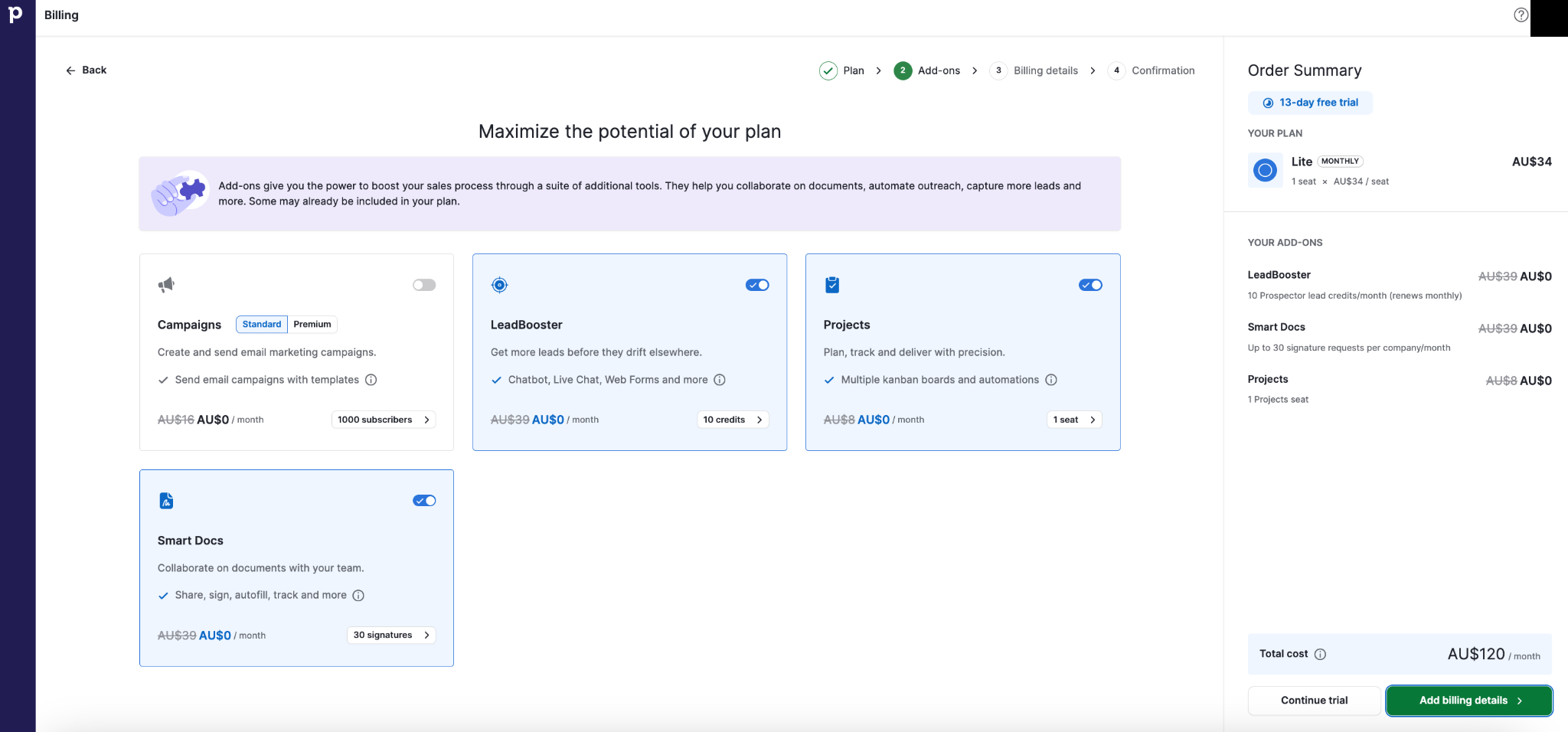
We did not purchase that configuration or those add-ons. A$120 was not Pipedrive's standard bundle price; it was the dated configuration shown in our trial. Trial-enabled features can make a final commercial configuration more expensive than the base plan suggests.
Which plans include the main add-ons?
The following inclusions are vendor-published plan entitlements; we did not execution-test them on every plan.
| Add-on group | Lite / Growth | Premium / Ultimate |
|---|---|---|
| LeadBooster, Projects, Smart Docs | Additional purchase | Included |
| Campaigns, Web Visitors | Additional purchase | Additional purchase |
Included add-ons can still have usage allowances. Check the current plan features and billing terms before buying.
GST, ABN and Australian billing
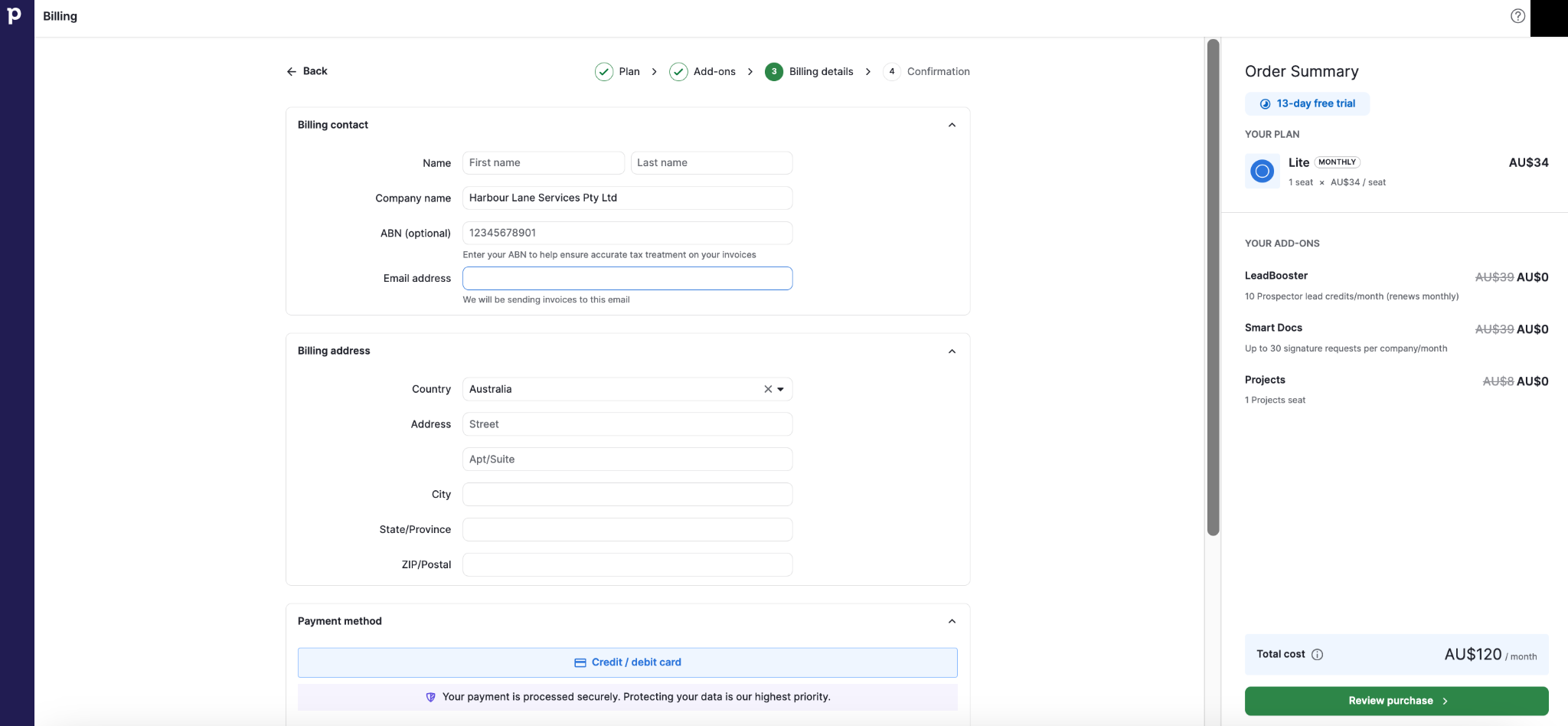
Pipedrive showed Australia as the billing country and included an optional ABN field.
The billing interface stated that entering an ABN helps ensure accurate tax treatment on invoices.
The plan prices we observed explicitly excluded applicable VAT, GST or other taxes.
We did not enter payment details, so we did not independently verify the exact GST amount at final checkout. We also do not assume that entering an ABN automatically removes GST.
Which Pipedrive plan should an Australian SME choose?
The plan descriptions below combine Pipedrive's published entitlements with the requirements we observed in our benchmark scenario. We did not execute the full test programme separately on all four paid plans.
Lite
Lite covers the core CRM basics and can suit a very small team that mainly needs contacts, organisations, deals, activities and a visual pipeline.
The biggest limitation is that workflow automation and full two-way email sync are not included.
Growth: the practical starting point for our SME scenario
For our benchmark Australian SME, Growth was the most practical starting plan.
It was the first tier to add workflow automation and one two-way email sync per seat, while increasing reports and custom-field capacity.
That does not make Growth the right plan for every business. A solo operator with very simple requirements may still be better served by Lite.
Premium
Premium becomes easier to justify when advanced reporting, additional customisation, Projects, enrichment, lead generation and routing, more email sync capacity or phone support have a clear business use.
Ultimate
Ultimate is harder to justify for an ordinary small business unless advanced security, permissions, higher limits or extended support are specifically required.
Vendor-published plan limits
These are Pipedrive's published plan entitlements, rechecked on 4 October 2026. They are not limits that SMEScout exhausted during hands-on testing.
| Plan | Reports per user | Custom fields per company | Automations per company | Synced email accounts per user |
|---|---|---|---|---|
| Lite | 15 | 30 | None | None |
| Growth | 50 | 100 | 50 | 1 |
| Premium | 250 | 300 | 150 | 3 |
| Ultimate | 500 | 500 | 250 | 5 |
Check current Pipedrive pricing
What we found in our hands-on test
Imports and migration safety
Our first contacts-and-organisations import produced 10 people and five organisations after mapping and validation. Pipedrive recorded 19 items added, 5 merged and 0 skipped.
A first deal import created unwanted duplicate records because the source file did not contain enough matching identifiers. Pipedrive's displayed duplicate rules explained why.
We used the built-in Revert function, corrected the CSV with person email and organisation address, and re-ran the import.
The corrected deal import mapped all 14 fields and finished with 6 items added, 12 merged and 0 skipped.
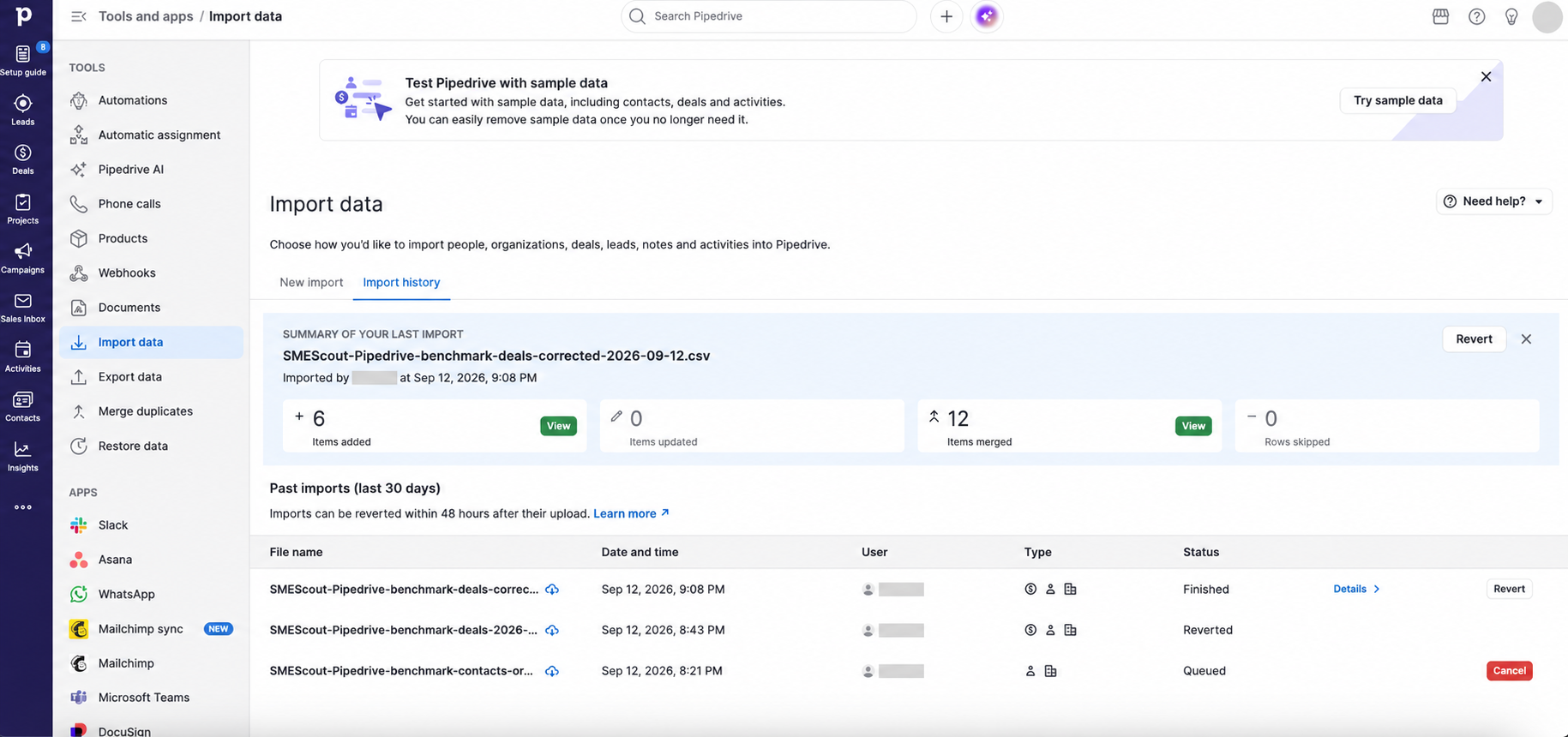
That combination of preview, merge handling and revert functionality was positive migration-safety evidence.
Pipeline and day-to-day deal management
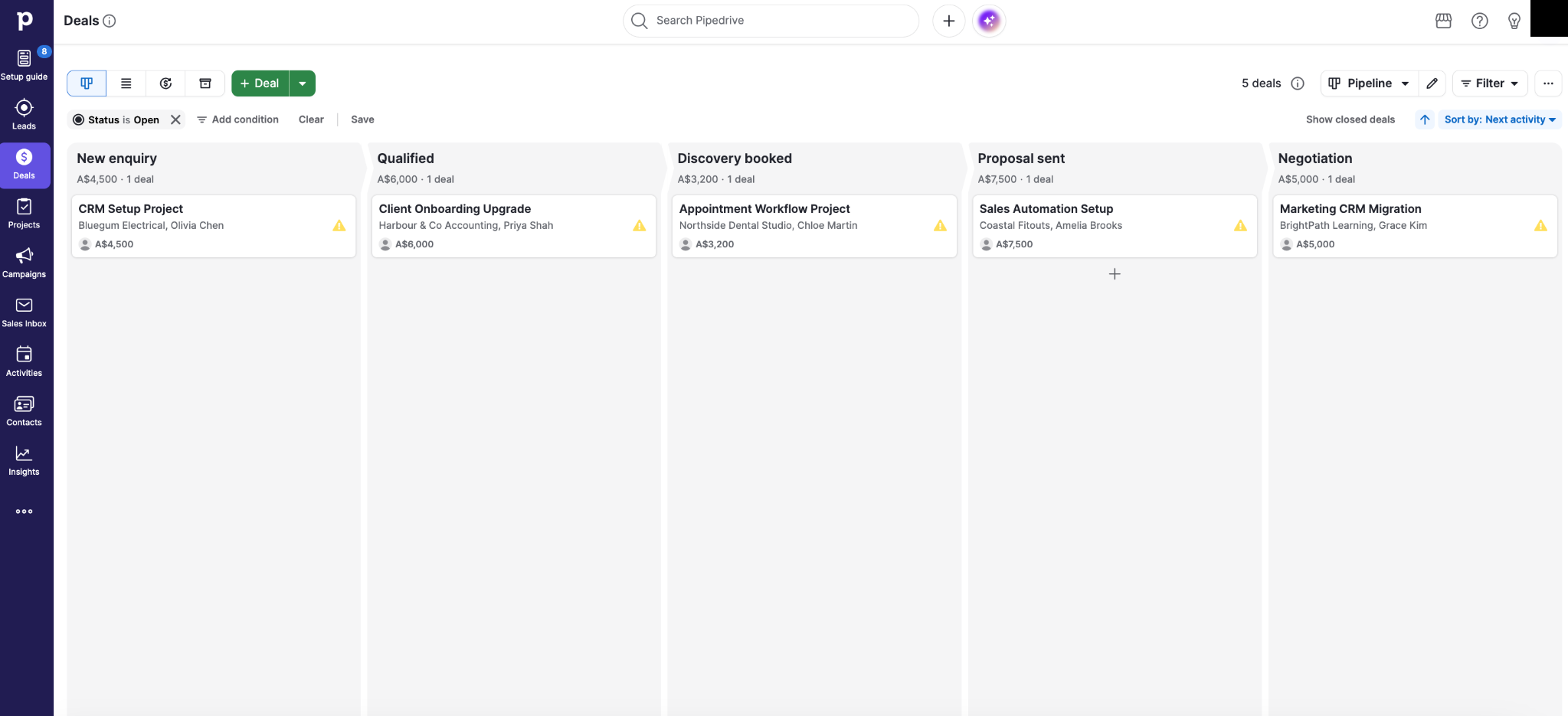
We created a five-stage pipeline: New enquiry, Qualified, Discovery booked, Proposal sent and Negotiation.
Five open fictional deals appeared across the pipeline with AUD values and linked contacts and organisations. Moving a deal by drag and drop correctly updated its history from New enquiry to Qualified.
Activities
We created a manual follow-up call activity. Pipedrive automatically linked it to the relevant deal, person and organisation. No real phone call was placed.
Automation and reporting
Our automation test succeeded
We built an automation triggered when a deal's stage changed to Proposal sent.
The action created an internal task called Follow up after proposal, due three days later. The automation used the Australia/Sydney timezone.
We activated it for a controlled test, moved a fictional deal out of Proposal sent and then back into that stage, and Pipedrive successfully created the follow-up task with the correct due date and linked records.
Reporting
We created Deal Progress and Activity Performance reports. Filters, chart and table views, and export controls were available.
One learning-curve issue is that the Deal Progress headline counts stage-entry events, which can exceed the number of unique deals.
Email capability
We inspected Pipedrive's Email Sync area but deliberately did not connect a real mailbox.
The interface exposed two-way sync, Sales Inbox, deal linking, bulk email, tracking, templates, Email AI and Team Inbox. Because we did not connect or send through a mailbox, those capabilities were not execution-tested.
Integrations for Australian SMEs
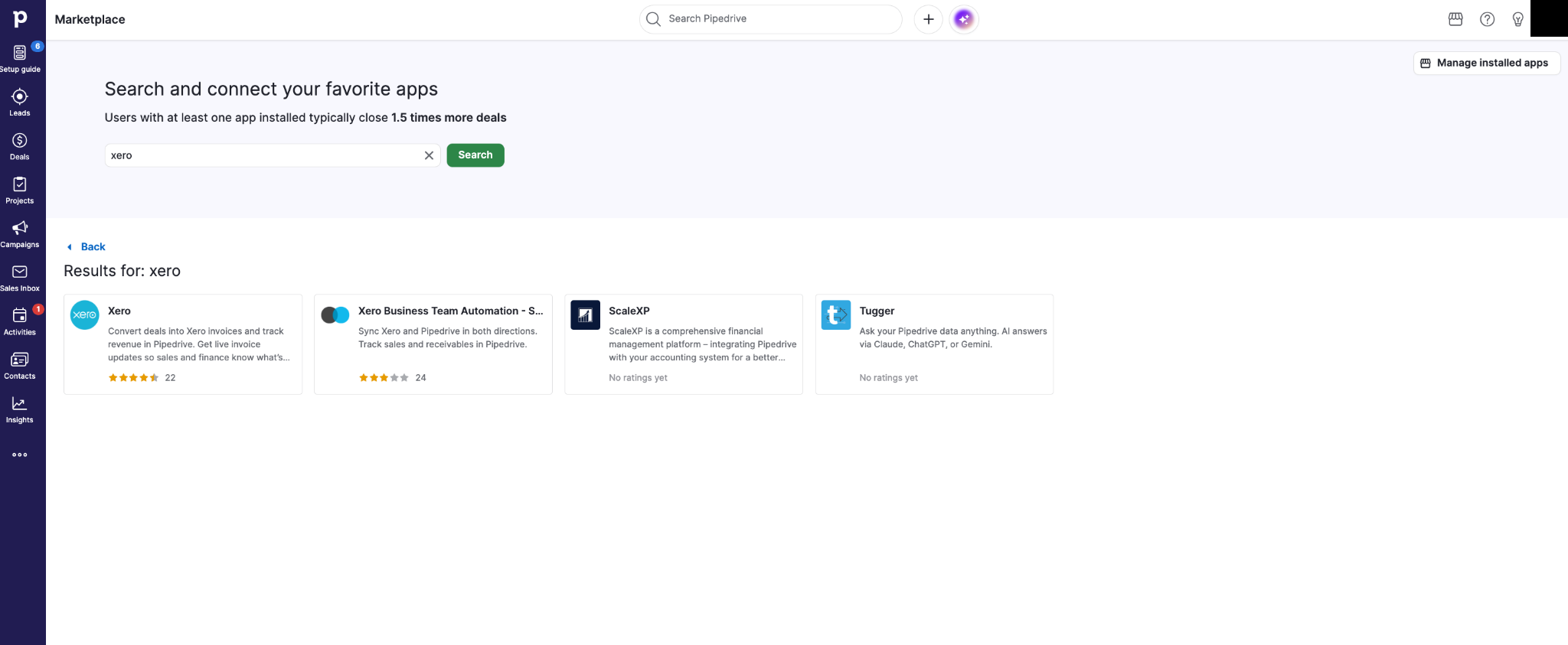
We directly observed marketplace listings for tools including Xero, QuickBooks, Zapier, Google Meet, Microsoft Teams, Slack, Mailchimp, WhatsApp Business, Zoom, Zendesk, Trello, Asana, monday.com, DocuSign and PandaDoc.
The Xero listing was particularly relevant for Australian businesses. It described deal-to-invoice conversion and revenue tracking in Pipedrive.
We verified marketplace listings only. We did not connect or execute those integrations.
SMEScout verdict
Pipedrive is a strong CRM option for Australian SMEs whose main requirement is managing opportunities through a clear sales pipeline and ensuring follow-up happens consistently.
In our pilot, the visual pipeline was easy to understand, imports were recoverable when we deliberately corrected a matching problem, the controlled automation executed successfully, and the Australian account exposed AUD pricing, billing-country selection and an ABN field.
The main caveat is cost. Seat charges accumulate quickly, displayed prices excluded applicable GST, and several of the features that make Pipedrive more compelling start at Growth or Premium.
For our three-user benchmark scenario, Growth offered the most practical balance of cost and published plan capability because it added workflow automation and two-way email sync without the larger jump to Premium.
If you are choosing between CRM products rather than Pipedrive plans, see our CRM software guidance for Australian SMEs.
Compare the tested workflows in our HubSpot vs Pipedrive Australia comparison. If HubSpot is on your shortlist, HubSpot Pricing Australia separates Free access from paid seats and subscription commitments.
Frequently asked questions
Is Pipedrive priced in Australian dollars?
Yes. Our Australian trial displayed Pipedrive pricing in AUD.
Does Pipedrive charge per user?
Pipedrive charges per paid seat, including a purchased seat that has not been assigned to a user. Total CRM cost therefore increases with the number of seats on the subscription.
Does Pipedrive support an ABN?
The Australian billing screen we tested included an optional ABN field and tax-treatment wording.
Which Pipedrive plan did we prefer for the test scenario?
Growth was the most practical starting plan for our fictional three-user SME based on the scenario's needs and Pipedrive's published entitlements. It was the first tier with workflow automation and two-way email sync.
Did SMEScout actually test Pipedrive?
Yes. We tested onboarding, contact and organisation import, deal migration and revert, pipeline use, custom fields, activities, a live internal-task automation, reporting, marketplace listings and Australian pricing and billing controls.